Four steps after install · First batch in 60 seconds
First time? Copy these 3 steps
- 1Click the Laifaxin extension icon in the top-right of your browser to open the panel
- 2Enter
restaurantas the keyword · select region US · California - 3Hit the blue [Start Search] button in the bottom-right · watch businesses roll in
| Business | Category | Phone | |
|---|---|---|---|
| ACME Lighting | Lighting store | +1-212-… | info@acme.. |
| Blue LED Co | LED supplier | +1-310-… | sales@blu.. |
| Bright Bulb | Light bulb supplier | +1-718-… | — |
| SoCal Hardware | Hardware store | +1-619-… | contact@so.. |
Why this scraping extension
Zero-setup · fully automated · high throughput · cross-device
Zero learning curve3 clicks to start
Built for sales reps with no technical background · install → type keywords → hit start · results land automatically.
Fully automatedRuns 24/7
Auto-opens the map, paginates, and extracts · no babysitting required · set it once and let it run overnight.
High throughputThousands in 10 min
Multi-threaded + dynamic loading · scrape thousands of businesses in 10 minutes · faster than any comparable tool.
No lock-inWorks on 5 major browsers
Works on Chrome, Edge, QQ, Bai Fen, 360 and any Chromium-based browser · seamless across devices.
3 steps to get going · ready out of the box
Pin the extension → run a scrape → manage and export
💡 第一步:安装与固定
前置:先按 📚 安装指南 完成插件下载与开发者模式启用。
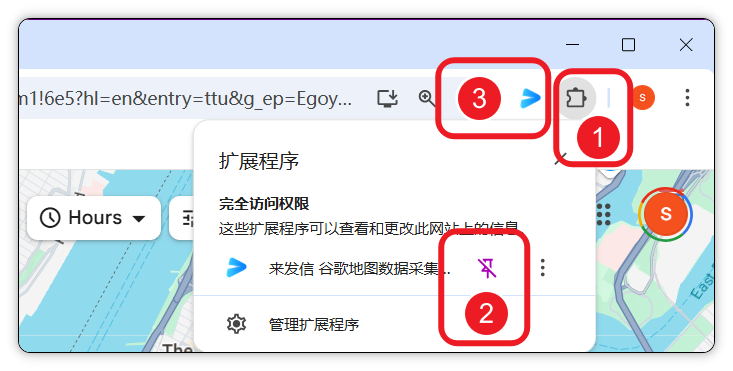
📌 固定插件 · 方便访问 —— 装好后建议把「谷歌地图数据采集专业版」插件固定到浏览器工具栏:点 扩展程序 拼图图标 → 找到插件 → 点 固定 图钉即可。
⚡️ 第二步:执行采集
推荐路径 —— 用「批量自动采集」模式 · 一次设定后台跑 · 含 3 个子步骤。
1️⃣ 进入任务面板
点浏览器工具栏的插件图标或地图悬浮窗的 【进入搜索页面】 按钮 · 打开批量采集任务面板。

2️⃣ 设置采集条件
成功的关键在于精确定义 关键词 与 地区。建议参考:
- 📚 客户开发方法论 — 如何选「黄金分类词」
- 📚 热门城市策略 — 大国家先采人口前 50 城
- 📥 官方分类列表 xlsx — 直接下载现成清单

3️⃣ 开启自动采集
⚙️ 全自动运行 —— 配置完成后点 【开启搜索】(右下角蓝色按钮)· 插件将全自动执行采集任务 · 实时展示进度条 + 数据预览 + 剩余时间。

💡 进阶 · 快速抓取当前页
适合 一次性少量数据。在 Google Maps 完成搜索后(例 restaurants in New York)· 直接点插件悬浮窗 【搜索当前页面】 按钮即可 · 不用回到主面板。

📦 第三步:管理与导出数据
采集完成后 · 可在插件内或云端对数据进行高效管理。
📊 数据处理与应用 ——

3 use cases · see how others use it
Real data, real scenarios · no fluff
NYC restaurants · 1,804 in 12 minutes
Scraped every restaurant across 73 cities in New York State · name, address, phone, rating included · the go-to for food-service suppliers.
Read the full case →California · LED lighting distributors
Multi-keyword search across Light bulb supplier / Lighting store · 209 high-quality leads · a must-have for lighting exporters.
Read the full case →Japan · manufacturing in top 50 cities
AI-generated list of the 50 most populated cities · paste into custom regions for targeted scraping · 80% of the data in 20% of the time.
Read the full case →What users say
Real feedback from foreign-trade pros
“I use Google Maps to locate local storefronts, then prep for phone outreach. Laifaxin is comprehensive and lets me link multiple products — the tagging system is great for trading companies because the products don't conflict with each other.”
“Bonnie's killing it! Thousands of target leads filtered in 10 minutes — the speed and accuracy slash the time we used to spend on early-stage customer research.”
“Thousands of target customers in 10 minutes. Laifaxin's bulk-send is so convenient — I can actually reel in customers. Tons of teammates are getting inquiries, and I landed a customer too. 666!”
5 questions new users ask
Read these before you start
How accurate is the data?
100% of the data comes from public Google Maps business listings (filled in by the businesses themselves at registration) · accuracy is very high. We only scrape — no post-processing. If a listing is incomplete on the map, the scraped record will be too (e.g. some businesses don't list a phone or email).
Which countries are supported? Can it scrape globally?
Global coverage · if Google Maps lists the business, we can scrape it. That includes North America, Europe, Southeast Asia, the Middle East, Latin America, and every other major market. Regional markets like Japan, Korea, and India are fully covered too.
How much can one run pull? Is there a cap?
The extension itself has no hard cap. Free users get 1,000 per run · registered users 2,000 · paid members unlimited. Batch mode runs across multiple regions · for large jobs, split them up (by state, province, or zip code).
Will Google rate-limit or ban my account?
The extension mimics human browsing behavior (random delays, natural scrolling, speed throttling) · it never calls any Google API, so there's no IP blacklist risk. For long-running jobs, we still recommend using a dedicated browser instance, isolated from your main browser and accounts.
What export formats? Does it integrate with other tools?
Exports to CSV / Excel · drop them straight into Excel, Notion, or your CRM. Cloud sync to the Laifaxin platform is also supported, where you can pair it with AI email extraction, bulk email sending, and follow-up tracking — a complete foreign-trade prospecting loop.
Next · start your first scrape
Installation is the start · follow the 60-second guide and land your first leads