Case Study: How to Batch Extract a List of New York Restaurants
Whether you're a food service supplier, a marketing agency, or an industry researcher, a precise and comprehensive list of restaurants in a target region is gold. This case study uses "Get a list of New York restaurants" as the example and shows you exactly how to do it efficiently.
Product page: Google Maps Scraper · Overview
Two methods to compare:
- Quick Capture — Grab the businesses on the current map page. Simple and direct.
- Batch Capture — Set up a task and let the plugin automatically sweep every city in NY State. Powerful.
1. Quick Capture: Grab the Current Page
Good for a fast, one-shot grab of one or a few pages of businesses visible on the map.
1. Search on Google Maps
- Open Google Maps and type a keyword like
restaurants in New York. - The map immediately shows relevant restaurants.

2. Launch the Plugin and Start Scraping
- Click the Laifaxin Plugin icon on the right of the map to open the plugin.
- Click Start Scraping — the plugin automatically grabs every business in the current list.

2. Batch Capture: Auto-Sweep an Entire State (Recommended)
The "super weapon" when you need to scrape an entire state or country.
1. Create a Batch Scrape Task
- Open the plugin's Tasks screen.
- Enter a keyword — e.g.,
restaurant. - Pick a region —
United States→New York, then select every city under it. - Create the task — click Create Batch Scrape Task.

2. The Task Runs Fully Automatically
- After creation, you can step away. The plugin opens new tabs in the background and searches and scrapes each city.
- Check real-time progress in the task list.
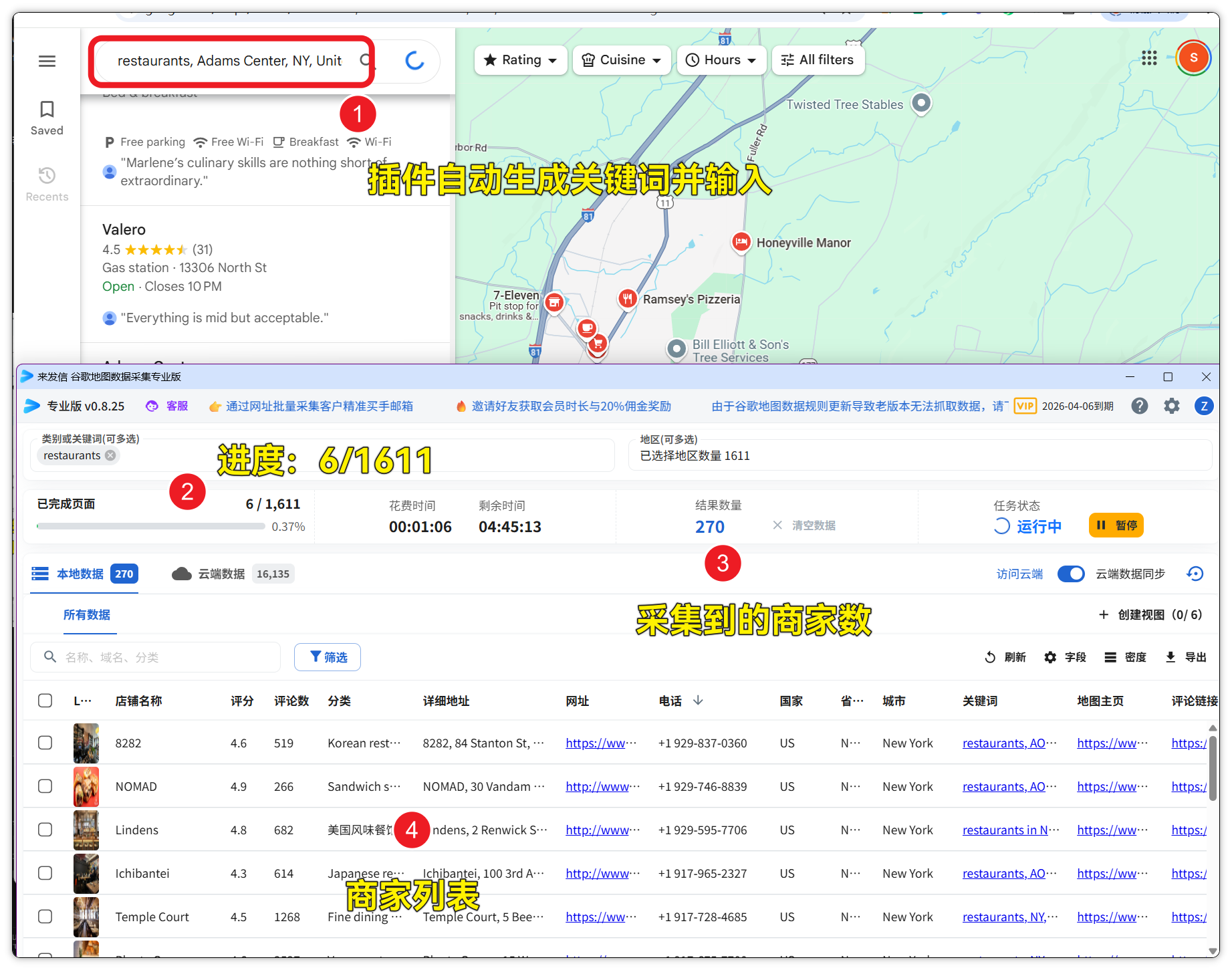
3. Check the Results
Give it a moment and the results are impressive — in our test it automatically visited 73 city pages in 12 minutes and collected 1,804 restaurants.

3. Data Processing and Export
Once scraping completes, the data lands in the plugin's Results list. Now pick how to use it.
Method 1: Direct Excel Export
- How — In the results list, select businesses and click Export.
- Why — Fastest way to get the data, perfect for immediate use.

Method 2: Sync to the Cloud for Management
- How — Click Sync to Cloud and head to the Laifaxin platform for more advanced operations.
- Why — Treat these businesses as long-term customer leads — integrate with CRM and email marketing.

4. What to Do Next · Turn the Data Into Value
Getting the restaurant list is just the start. The real value is what you do with it.
-
Send outreach emails — Batch-extract emails and pitch your product or service.
-
Call or message on WhatsApp — Use the phone numbers in the list for precise outreach.
-
Run market analysis — Use addresses / coordinates to map restaurant density and find market gaps.
- Method 1: How to Use Google Maps Business Addresses
- Method 2: How to Use Google Maps Business Coordinates
Permanent link: https://laifa.xin/chajian/how-to-extract-restaurant-list-in-new-york-area-from-google-maps